Reversible AI edits
snapshot checkpoints any part of your place and restore brings it back exactly, long after Studio's undo stack has moved on.
Tufan-Blox-Bridge connects Claude Code, Cursor or any MCP client to Roblox Studio. Your AI gets 85 tools for Luau scripts, instances and properties, and you get snapshots, git history and a backdoor scanner to keep its work safe.

You need Node.js 18 or newer. Run the command in your Roblox project folder, or paste the prompt below into your AI agent.
Setup installs the MCP server and the Studio plugin, and registers with Claude Code or Cursor.
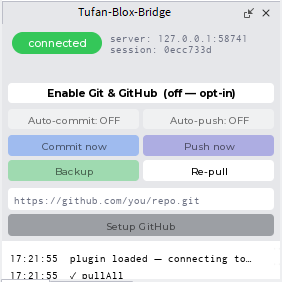
Open the Tufan Studio button in the Studio toolbar. A green pill means your AI is connected.
Run this
npx -y tufan-blox-bridge@latest setupOr paste this into your AI agent
Set up Tufan-Blox-Bridge, a Roblox Studio MCP server and plugin, for this project.

1. Run `npx -y tufan-blox-bridge@latest setup` in this folder. It installs the server and the Studio plugin, and registers with Claude Code or Cursor.
2. If it says nothing was registered, add the config it prints to your MCP settings, keeping any servers already there.
3. Don't ask me for API keys. They're optional.
4. Tell me what it did and the next steps it printed.
Claude Code, Cursor or any MCP client
Queues commands, syncs files and runs git on your machine
Runs each command inside Roblox Studio and mirrors your scripts
Everything runs on your machine. Your AI calls a tool, the server queues a command, the plugin picks it up inside Studio and sends back the result. Run several Claude or Cursor sessions at once and the server handles their commands one at a time, so they never collide.
snapshot checkpoints any part of your place and restore brings it back exactly, long after Studio's undo stack has moved on.
Open a place and its scripts mirror to a folder. Edit a file and Studio updates. Edit in Studio and the file updates.
12 git tools, off until you switch them on. Commit, diff, push to GitHub, and get deleted scripts back with git_recover.
scan_backdoors checks scripts, attributes and values for hidden require payloads, obfuscation and Discord webhooks in free models.
Selene, luau-lsp and StyLua run over your synced scripts, so your AI catches type errors and bad requires before the code runs.
batch, create_tree and mass_edit make thousands of changes in one round trip and one undo step, with no throwaway Luau to debug.
project_health, scan_perf and scan_responsive give you a census of the place, a ranked list of frame killers and tap targets that are too small.
With your own Open Cloud key: read and edit DataStores, run server Luau against the published game, read production logs and upload assets.
Set TUFAN_READONLY=1 and the 36 write tools disappear, so an AI can explore your game with no chance of changing it.
project_health
Place: "GRAM BANGLA"
Instances: 3960
Scripts:   1  (28.1 KB of Luau)
Parts:     1742  (593 mesh, 0 union)
Particles: 0   Lights: 0
Tags: 104   StreamingEnabled: on
scan_backdoors
Scanned 1 scripts (+ attributes & values) — no suspicious patterns found.
Real output from two read-only tools, run on Gram Bangla, the Roblox game we're building with this same bridge. We trimmed the place ID.
Roblox's built-in server is excellent at running and seeing your game. Tufan is the add-on for building it safely and keeping it versioned. Install both, because they cover different jobs.
| You want to | Built-in Studio MCP | Tufan add-on |
|---|---|---|
| Play test with a real character, keyboard and mouse | Use this | Left to the built-in server |
| Take a screenshot of the viewport | Use this | Left to the built-in server |
| Debug inside a running game | Use this | Warns the AI and points it there |
| Checkpoint and restore after a bad AI edit | Not included | snapshot / restore |
| Keep scripts on disk with two-way sync | Not included | Automatic mirror |
| Commit, diff and recover deleted scripts | Not included | 12 git tools |
| Scan free models for backdoors | Not included | scan_backdoors |
| Lint, type-check and format Luau | Not included | Selene, luau-lsp, StyLua |
| Read and edit live DataStores | Not included | datastore (Open Cloud) |
| Build many objects in one call | By writing Luau yourself | batch, create_tree, mass_edit |
Based on each server's published tool list in November 2026. Roblox updates its server often, so check its tool list for changes.
MCP, the Model Context Protocol, is how AI coding tools talk to other software. A Roblox Studio MCP server gives your AI tools it can call to read and change your place. Tufan-Blox-Bridge is a free one, with a Studio plugin that carries out each command.
Run npx -y tufan-blox-bridge@latest setup in your Roblox project folder. It installs the server and plugin and registers with Claude Code. Restart Studio and Claude Code, then open the Tufan Studio toolbar button. A green pill means it's connected.
It works with any MCP client over stdio, including Cursor and Claude Desktop, and setup prints the config to add if it can't register for you. We use it every day with Claude Code, so that's the path we've tested most.
No. It's an add-on. Keep the built-in server for play tests, screenshots and live debugging, and use Tufan for editing, safety, versioning and audits. Tufan tells your AI which server to use for each job.
Yes, for everything that happens in edit mode. You won't have screenshots or play testing, because Tufan leaves those to the built-in server.
Yes. The npm package is the MCP server your AI talks to, and the plugin carries out the commands inside Studio. The setup command installs both.
Yes, it's MIT licensed and there's no paid tier. Only the optional AI 3D-asset tools need a paid Meshy plan, and you bring your own keys.
You choose how much it can do. Read-only mode hides every write tool, snapshots protect risky edits, and tools that touch your published game need a separate Open Cloud key. Your keys stay on your machine. The backdoor scanner reads your place, not the source of installed plugins, so it can't vouch for those.
We build and test it on Windows. A macOS installer is included, but we haven't tested it yet, so please open a GitHub issue if something breaks.
Read the code, star the repo, or tell us what tools you want next.
Need a Roblox game or system built? Hire a Roblox developer →← Back to Tufan Studio